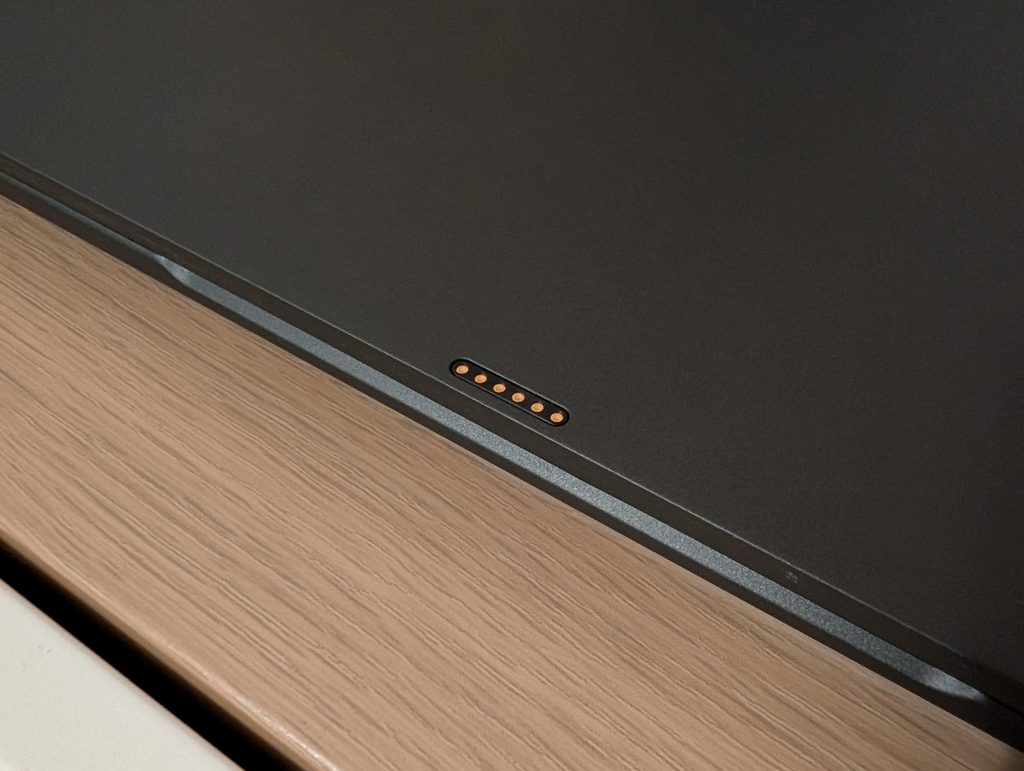
Many popular Linux laptops are not designed from the ground-up for Linux. Often, they are machines designed and assembled by companies like Clevo, with parts and options picked by the Linux OEM to optimise them for Linux to make sure the hardware is optimally compatible. While there’s nothing wrong with this approach – there are countless great Linux laptops available that are made this way – there’s also something to be said for starting with a blank slate, and designing, developing, building, and assembling a Linux laptop entirely from scratch. One such laptop is Star Labs’ brand new StarFighter, which I’ve been using and testing over the last little while since it was launched. The StarFighter is an entirely custom powerhouse of a laptop, designed exclusively for Linux, both inside and out. Let’s talk about what it’s like to use the StarFighter, and if it’s worth considering when looking for a new laptop. The hardware The Starfighter comes in three flavours: Standard, Ultra, and AMD. I opted for the Ultra model, which comes with an Intel Core Ultra 9 285H, an Intel Arc 140T integrated GPU, 64GB of LPDDR5X RAM, and a 16″ 3840×2400 120Hz matte display. The standard model steps these specs down to an Intel Core Ultra 5 125H, 32GB of LPDDR5X RAM, and a 16″ 2560×1600 165Hz display, while the AMD model maintains the specifications of the Ultra, but with an AMD Ryzen 7 8845HS processor paired with a Radeon 780M integrated GPU. All three models share the same Intel AX210 Wi-Fi 6E chip, soldered RAM, and port configuration: 2 USB-C ports (Thunderbolt 4 on the Intel models), 3 USB-A ports, an HDMI 2.0 port, a microSD reader, a combined audio jack, and two PCIe Gen 4 NVMe slots on the motherboard. All three models run coreboot firmware, and come with a hardware kill switch for the wireless radios. Another really interesting security and privacy feature is how the Starfighter handles its webcam. Instead of being integrated into the display bezel, the webcam is a separate module that snaps onto the display lid magnetically, connecting through a few pogo pins (which form a USB 2.0 port, which I’m sure intrepid hardware hackers could do fun stuff with). When not in use, the webcam module is stored in its own little metal tray that slides out of the side of the laptop, securing itself in place magnetically. Neat. The webcam quality itself is decidedly average. I personally don’t ever use a webcam, but if you do, don’t expect miracles. It does its job, no more, no less. The StarFighter has a custom chassis made out of magnesium, with the only plastic part of the casing being the display inner hinge cover where I assume the antennas are integrated. It’s an incredibly sturdy device, with very little flex in the display cover, and zero flex in the keyboard deck. Thanks to the properties of magnesium, it’s quite lightweight at a mere 1.6kg. The bottom cover is easily removable, but the two screws in the middle of that cover are ever so slightly longer than all the other screws – ask me how I know. Star Labs opted for an understated, unobtrusive design. There’s no weird flourishes, no garish RGB lighting, no childish font on the keyboard – it’s all business, and I really like that. The dark finish feels incredibly nice, and despite the colour doesn’t seem to catch too many fingerprints. The speaker grills next to the keyboard look nice too, as does the keyboard itself – I especially appreciate that the the various modifier and non-character keys use text labels instead of symbols. Of course, since this is a Linux laptop, the super key is properly labelled. No Windows logo here, but no silly penguin either. The keyboard is backlit, of course, with several light levels, with a keyboard backlight timeout adjustable in coreboot. Using it The feel of the keyboard could use some work, however, at least for me. In particular, the key stability feels a bit off to me, meaning that unless you strike a key right in the middle, it might not register properly, as the keys wobble more than I would expect. A workaround, of sorts, is to strike the keys a bit harder than you normally would, but I’ve found this to be more difficult to adapt to than I initially expected. That being said, if you already have a more solid strike, it’s possible you won’t notice anything wrong with the keyboard at all. The trackpad, though, is basically perfect. Star Labs pulled out all the stops here, and went for a large haptic trackpad that feels absolutely incredible. I greatly prefer haptic trackpads, and have been puzzled for years now why Linux laptop OEMs continue to opt for wobbly diving board-style trackpads instead. It has a glass surface which hits the perfect middle-ground between smooth and textured, and it never seems to pick up any smudges or grease. Several of the parameters of the haptic trackpad can be configured in coreboot and supposedly from within Linux itself, but I haven’t figured that part out yet as the patches for it were only accepted very recently. It is the perfect trackpad. Zero complaints. Every single click, every single gesture, every single swoosh feels perfect. I don’t like being this ecstatic about something – there’s usually flaws in everything – but it’s really just that good. While testing the StarFighter, I used some other laptops with the old diving board design, and they’re all ruined for me now. I’m usually a fan of smaller laptops, with 14″ being my upper bound. However, laptops have gotten so light, and bezels so thin, that the 16″ of today is the 14″ of several years ago – not exactly, but you get my point. I definitely had to get used to this larger laptop, but now that I have acclimatised, having 3840×2400 pixels spread out across a 16″ canvas is honestly kind of amazing. I
Continue to OSnews →You are being forwarded in 6s — stay on this page